Integration: SaaS Alerts and Syncro PSA
 Security and navigation
SaaS Alerts
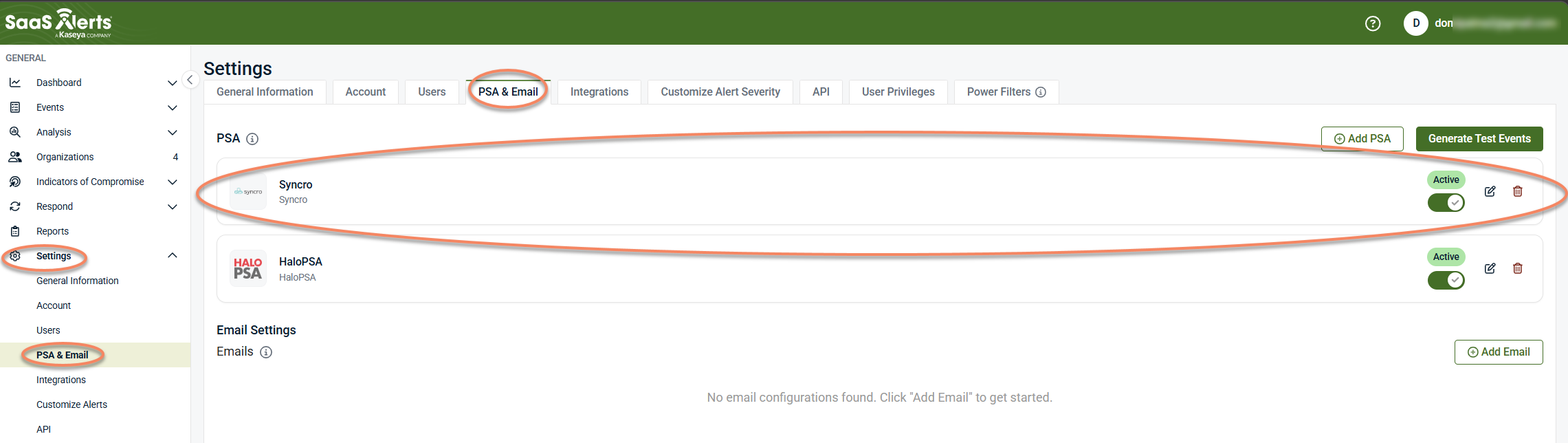
NAVIGATION Settings > PSA & Email
PERMISSIONS Ability to configure integrations and manage API credentials
Syncro
NAVIGATION More > Admin > API Tokens
PERMISSIONS Ability to create API tokens with custom permissions
The Syncro PSA integration connects Syncro (a combined RMM and PSA platform) to SaaS Alerts and enables ticket creation, organization mapping, and optional contract configuration.
Syncro also includes an RMM (remote monitoring and management) component that can be connected to SaaS Alerts as an MSP tool to provide device and user activity data for Unify. For more information, see Syncro RMM integration.
This integration does not generate event alerts.
Prerequisites
Before you begin, ensure you have the following:
-
An active SaaS Alerts account with access to Settings
-
Permission to add PSA integrations in SaaS Alerts (Settings > PSA & Email)
-
Access to your Syncro instance with permission to create API tokens (More > Admin > API Tokens)
-
A Syncro API token with the required custom permissions (see Create an API token in Syncro)
How to...
Create an API token in Syncro
To create an API token, complete the following steps:
-
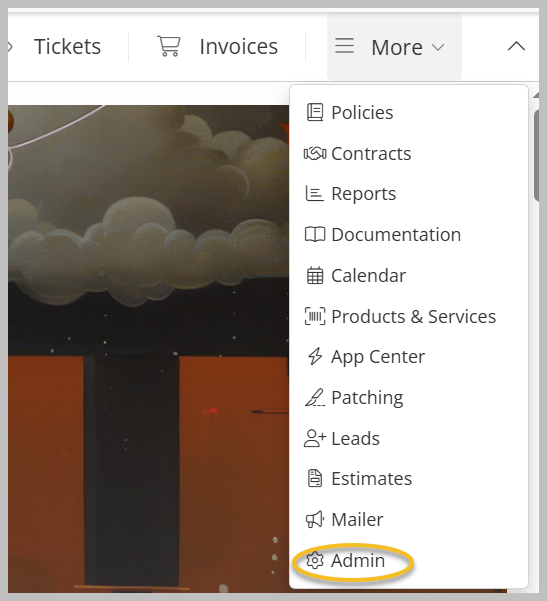
Expand the More menu and click Admin.
-
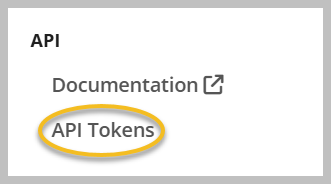
Scroll down and click API Tokens under API on the side navigation menu.
-
Click + New Token.

-
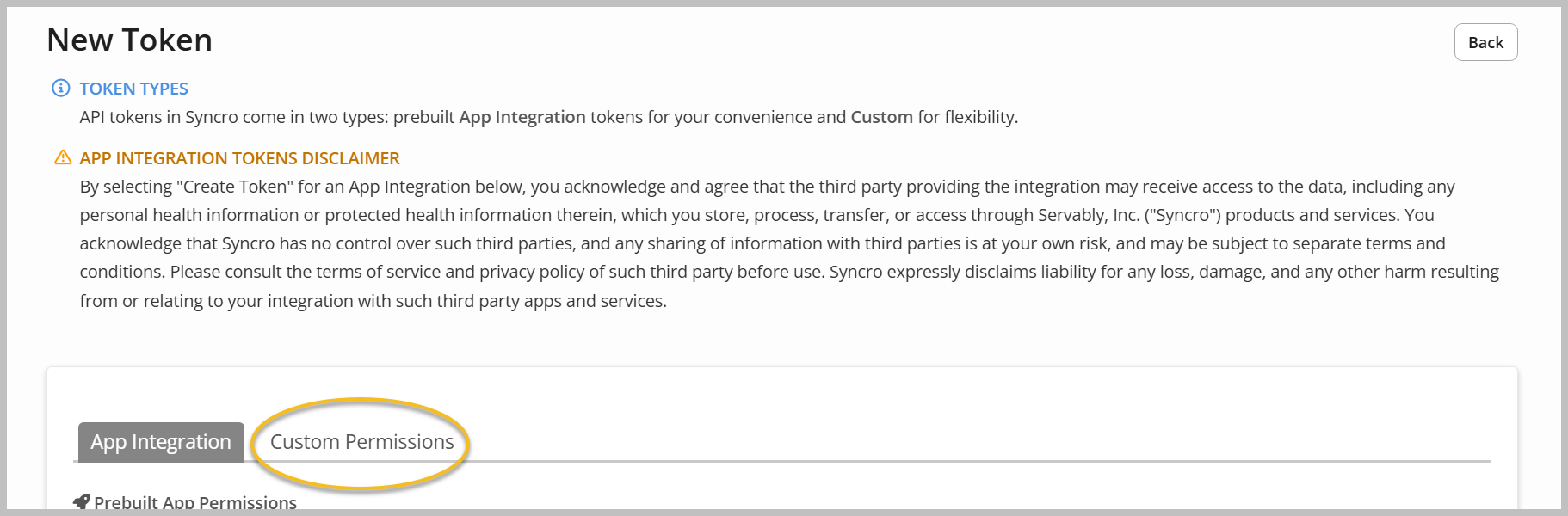
Select Custom Permissions.
-
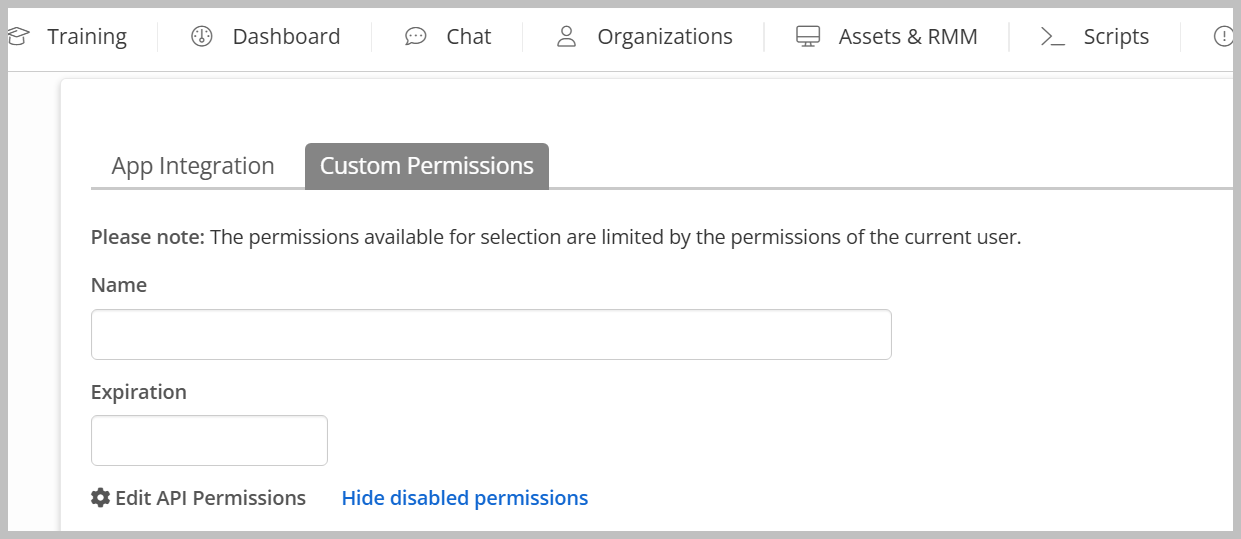
Provide a name and expiration date.
-
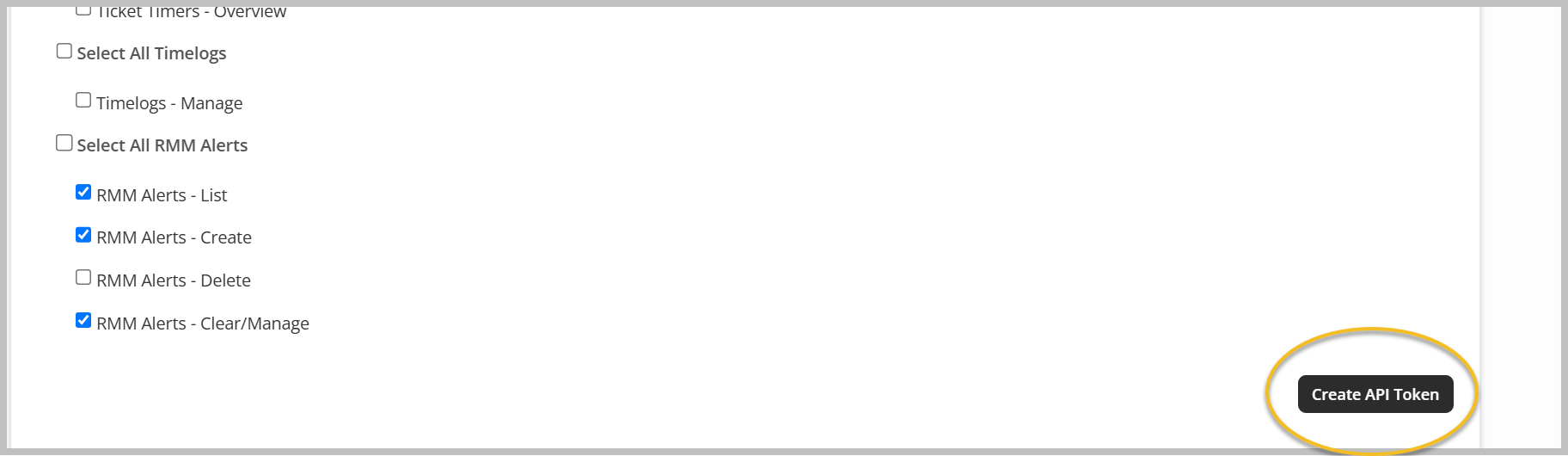
Assign permissions as needed. Recommended permissions are as follows:
-
Assets - View Details
-
Assets - List/Search
-
Contacts - Import
-
Customers - List/Search
-
Customers - View Detail
-
Customers - View Total Invoiced
-
Products - List/Search
-
Products - View Cost
-
Line Item - Edit Prices
-
Line Item - View Cost
-
Line Item - Add Manual Item for Invoices/Estimates
-
Tickets - List/Search
-
Tickets - View Details
-
Tickets - Create
-
Tickets - Edit
-
Ticket Comments - New
-
Recurring Invoices - List
-
Recurring Invoices - Edit
-
RMM Alerts - List
-
RMM Alerts - Create
-
RMM Alerts - Clear/Manage
-
-
Click Create API Token.
-
Copy the token, store it securely, and click Done.

Outcome: The API token is available for use when connecting Syncro in SaaS Alerts.
Additional integrations may provide identifiers used for correlation. For more information, see Unify overview and Information on Microsoft Entra Device ID.
Set up the integration in SaaS Alerts
To enable the integration, complete the following steps:
-
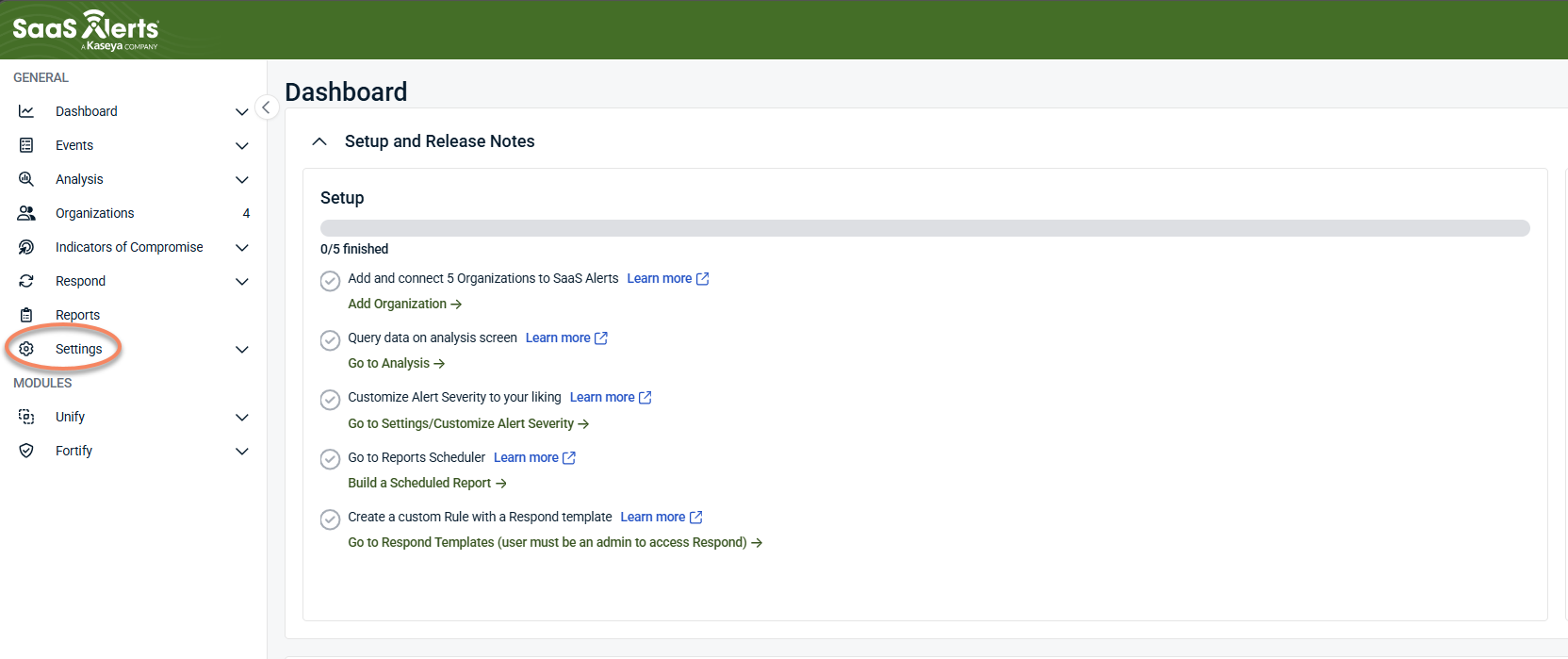
From the side navigation menu, click Settings.
-
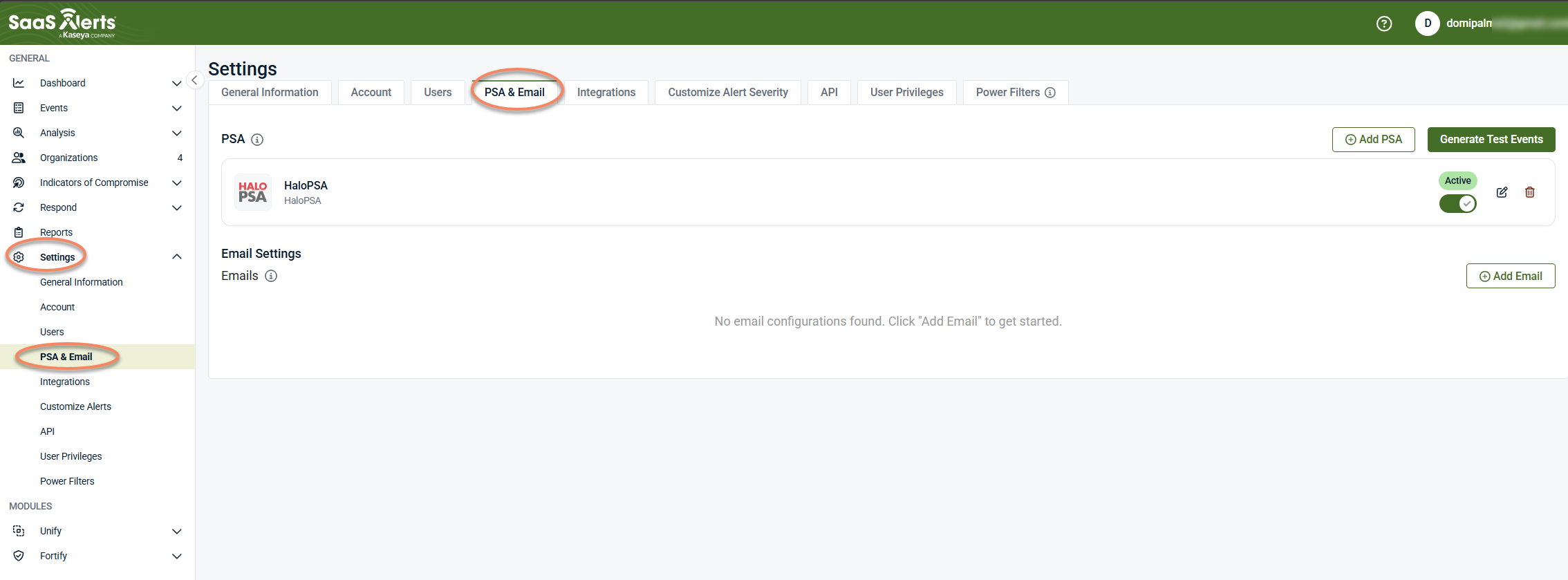
Select PSA & Email.
-
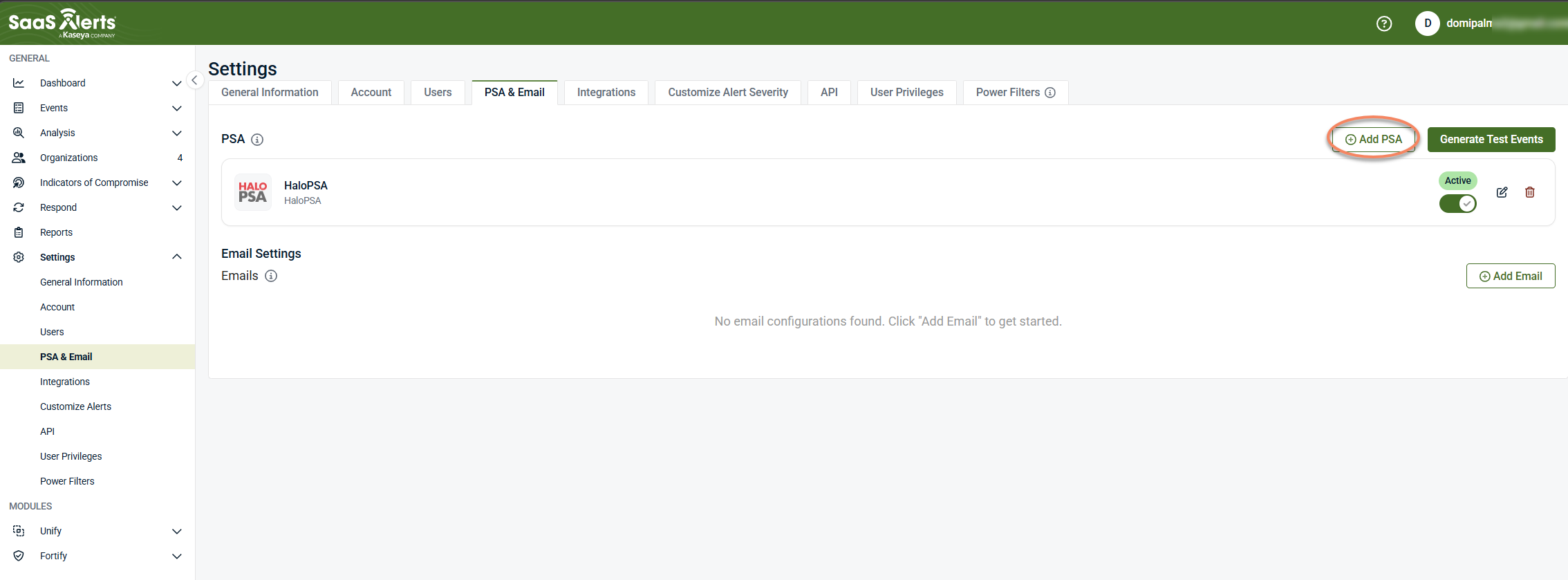
Click + Add PSA.
-
Select Syncro.
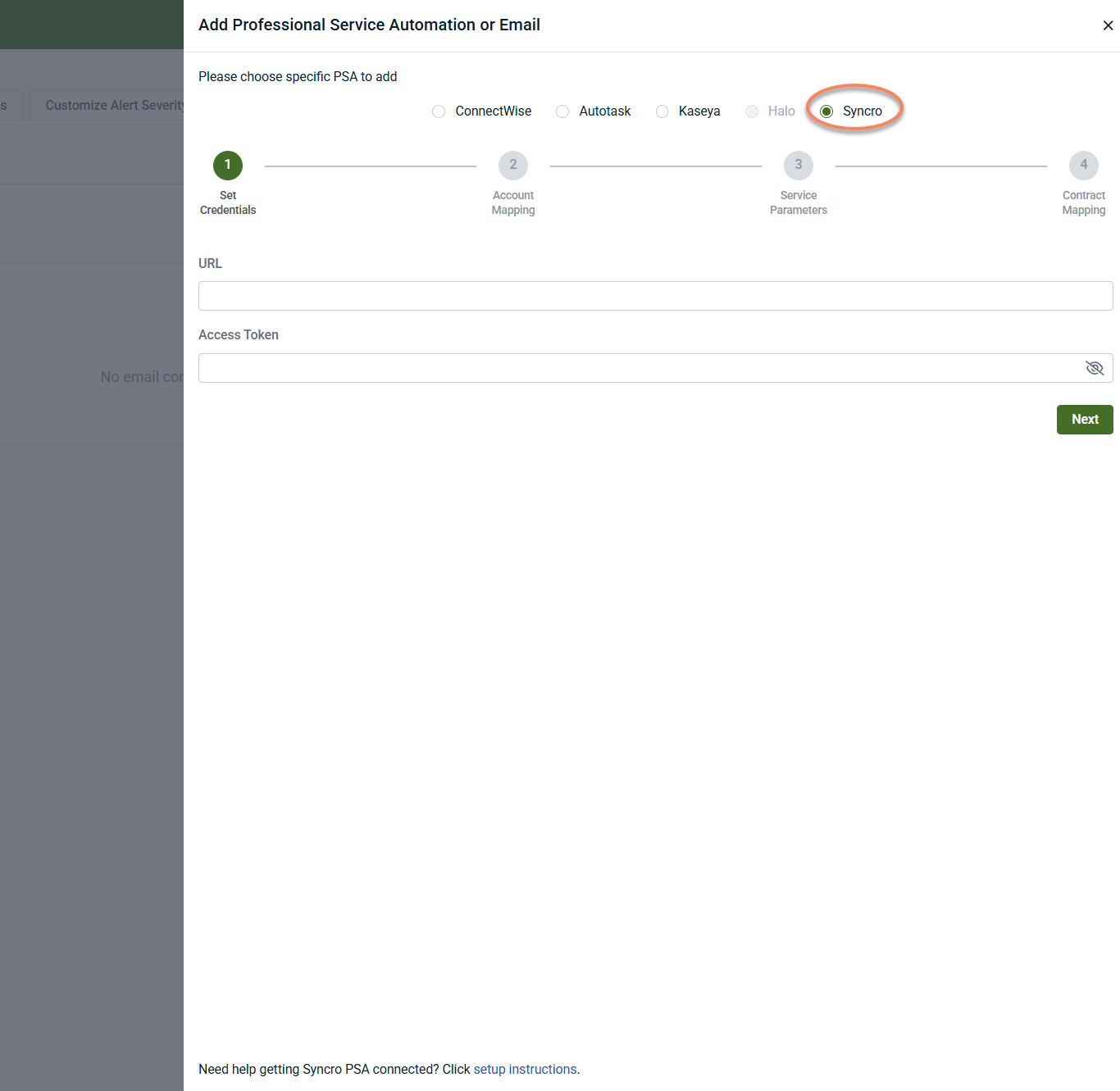
Connection wizard in SaaS Alerts
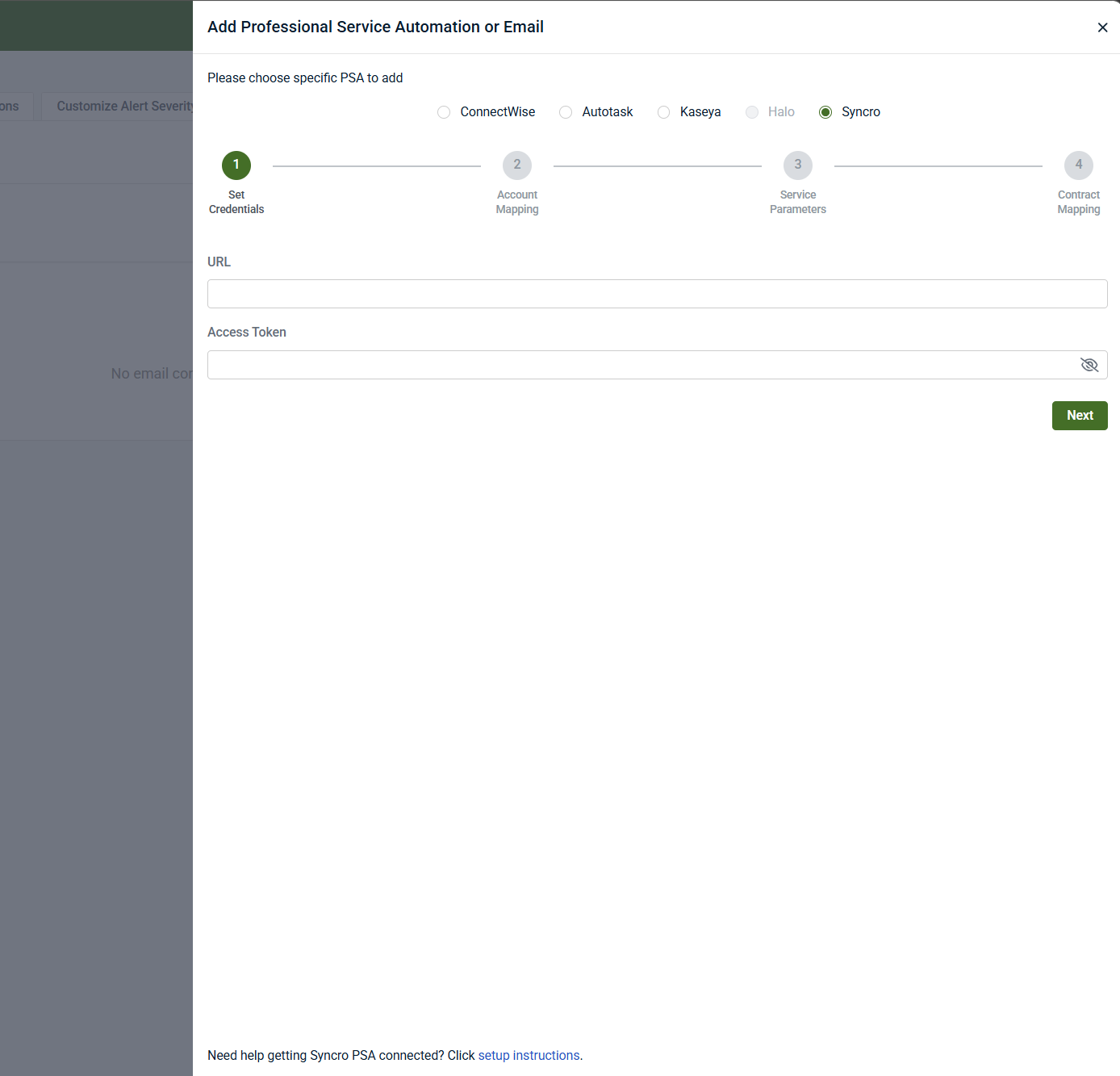
Step 1: Set credentials
-
Enter the Syncro URL and API token created earlier.
-
Click Next.
If credentials are valid, the wizard proceeds to Account Mapping.
Outcome: Connection to Syncro is established.
NOTE If an existing Syncro integration is already configured, you may see a warning. Unless you are intentionally connecting multiple Syncro instances, cancel the setup to avoid creating duplicate integrations.
Step 2: Organization mapping
After the Syncro credentials are validated, the wizard moves to Account Mapping.
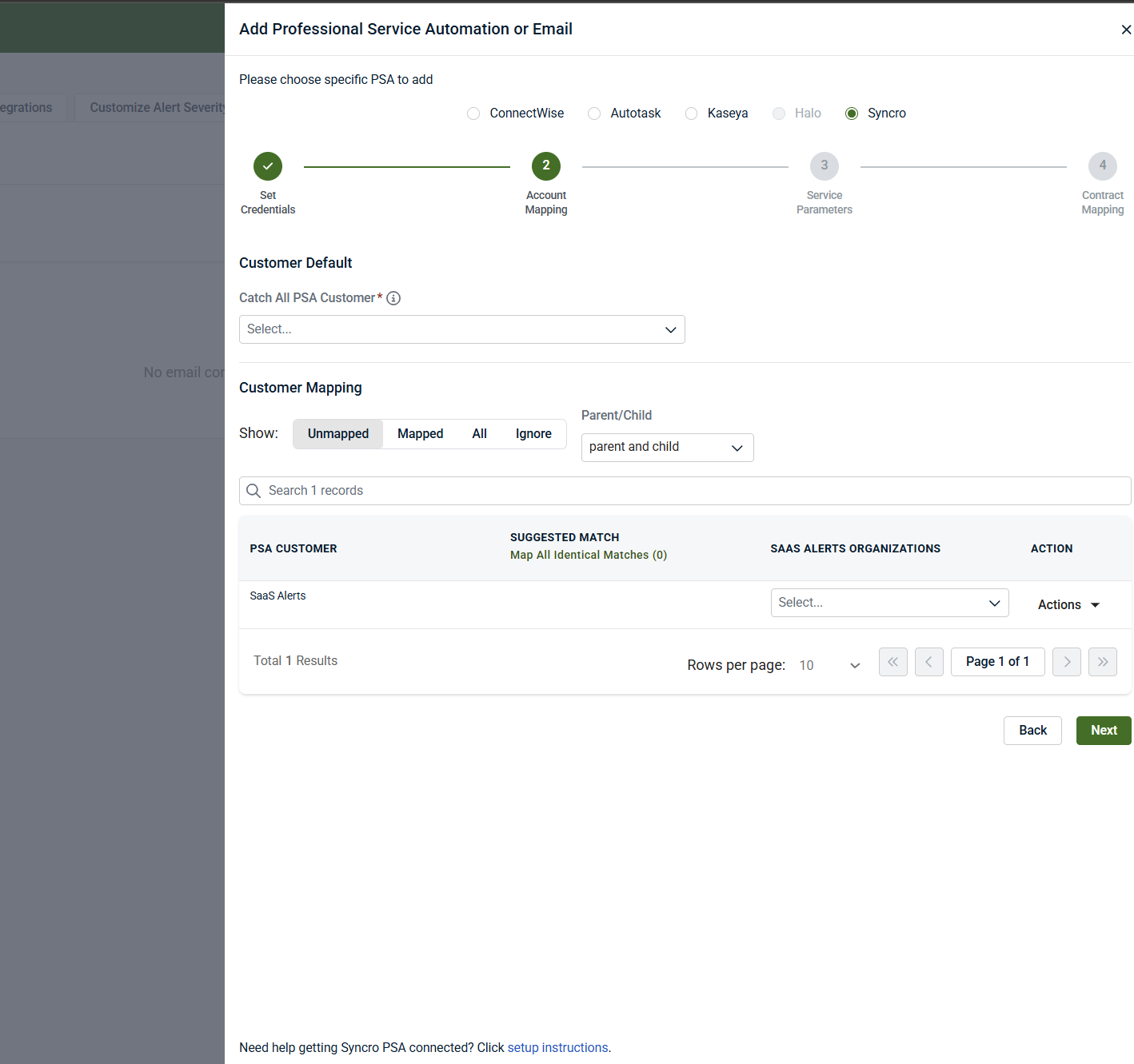
This step is required. The integration cannot be completed until a default PSA account is selected and organization mappings are defined.
If no appropriate SaaS Alerts organization exists, you can create one during the mapping process.
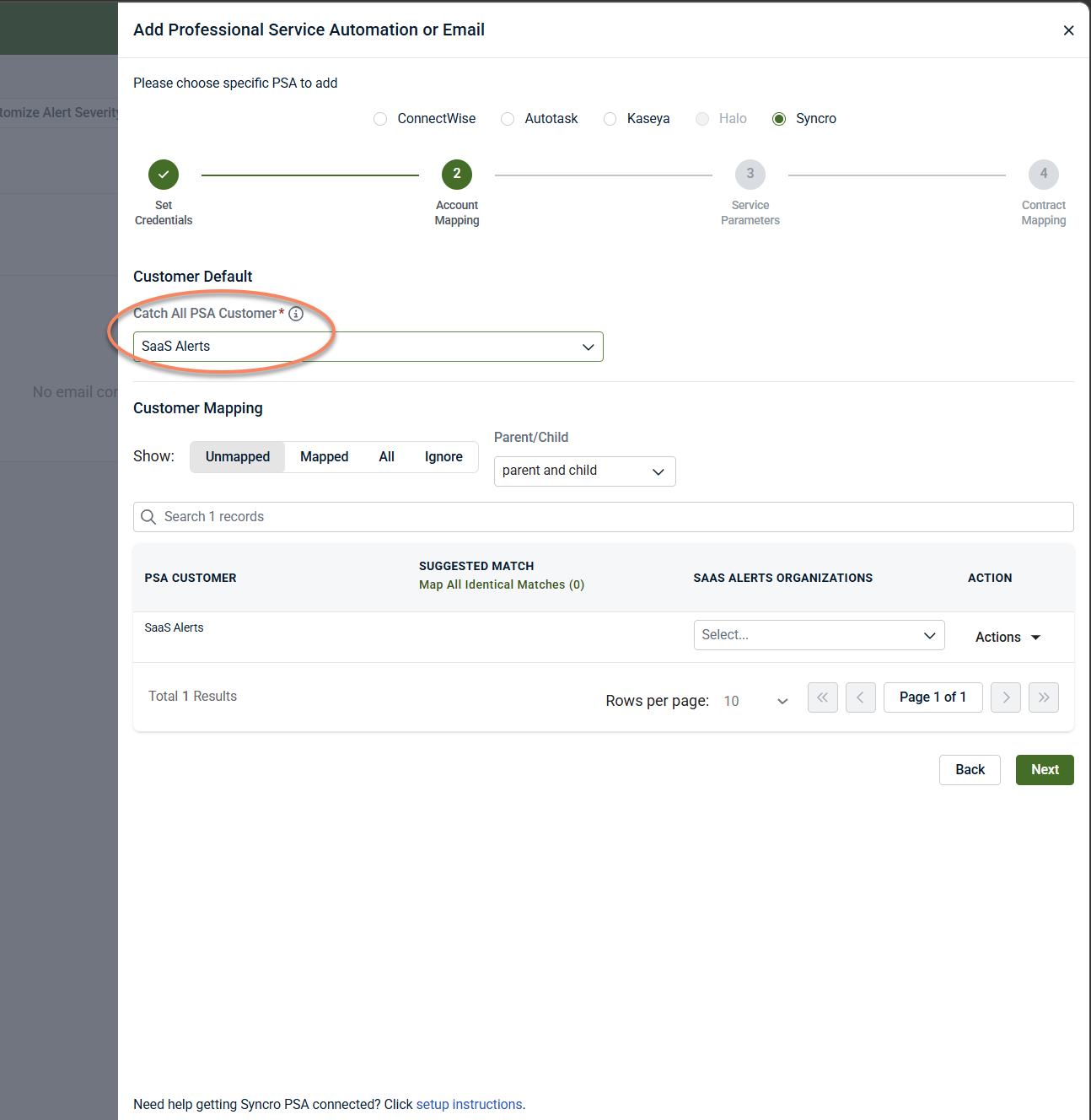
Customer Default (required)
Select a Catch‑All PSA Customer. This account is used when a specific SaaS Alerts organization does not have an explicit mapping.
-
For each Syncro customer, select the corresponding SaaS Alerts organization from the mapping list.
-
If a matching organization does not exist in SaaS Alerts, you can create one directly from this step using the available actions.
-
You can use the search field to locate specific customers or organizations.
-
You can also choose to ignore specific Syncro customers so they are not included in the mapping list.
NOTE You can edit the Syncro connection at any time after setup to update mappings or add new ones.
Step 3: Ticket parameters
In this step, you define the default ticket properties used when SaaS Alerts creates tickets in Syncro, along with optional overrides for specific alert types or rules.
Several fields in this step are required. The wizard will not allow you to continue until mandatory defaults are set.
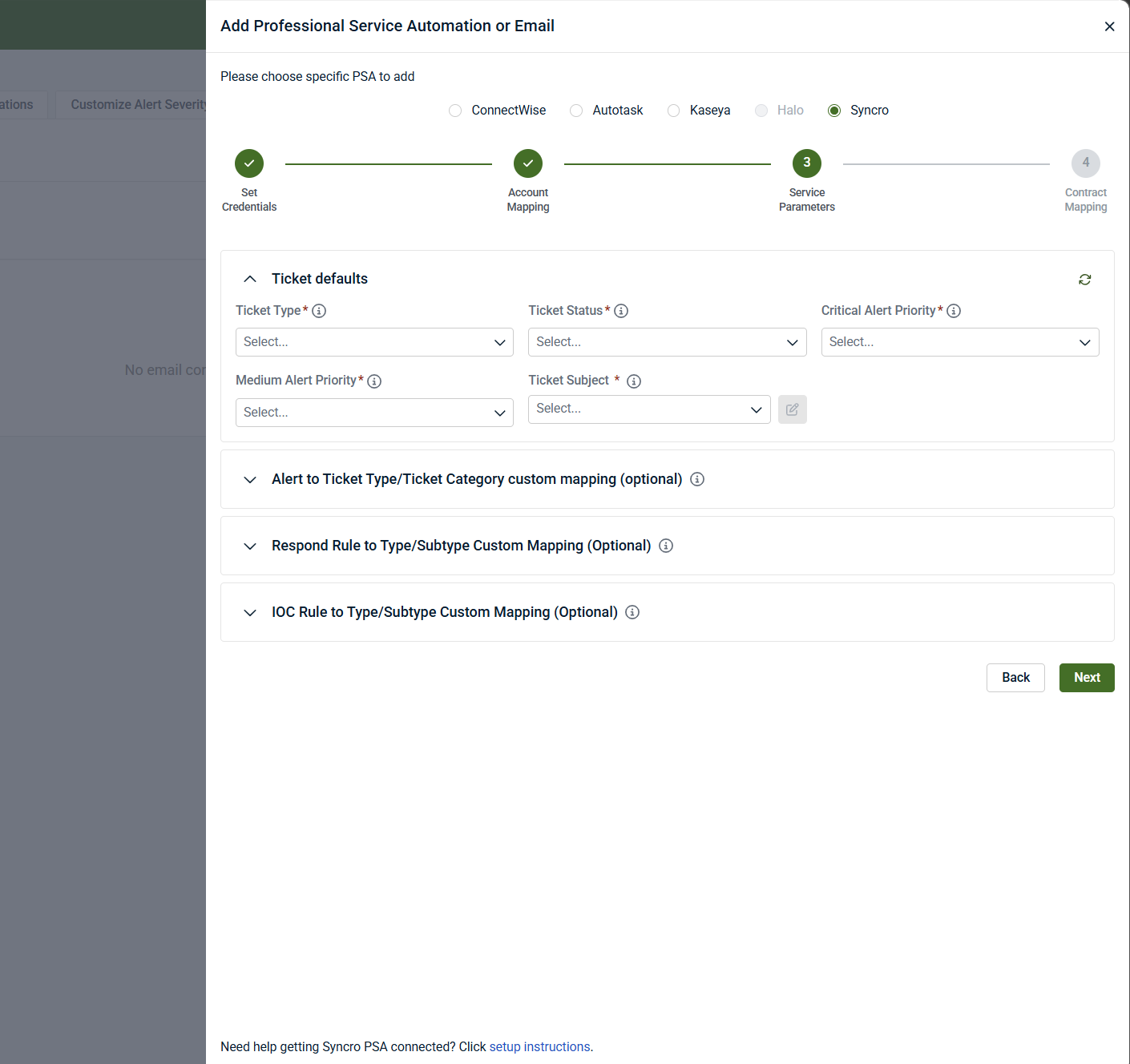
Ticket defaults (required)
Ticket defaults define how all new tickets generated from SaaS Alerts are created in Syncro unless overridden later in this step.
You must configure the following:
-
Ticket Category: The category applied to all new tickets.
-
Ticket Type: The Syncro ticket type used for new tickets.
-
Ticket Status: The initial status assigned to new tickets.
-
Ticket Queue: The service queue where new tickets are placed.
-
Ticket Source: The source value assigned to tickets created by SaaS Alerts.
-
Ticket Subject: The subject format used for ticket creation and ticket grouping.
-
Alert Priority Mapping: How SaaS Alerts alert severities (for example, Critical and Medium) map to Syncro ticket priorities.
These defaults apply globally unless a custom mapping is configured below.
Ticket subject and grouping behavior
The Ticket Subject determines both:
-
The subject line of newly created tickets
-
How subsequent alerts are grouped as notes or activities on existing tickets
Choose a subject format that aligns with how you want related alerts grouped within Syncro.
Note defaults (required)
When SaaS Alerts adds notes to an existing Syncro ticket, these settings control how the note is created.
You must configure:
-
Note Type: The Syncro note type used when adding notes
-
Note Visibility: Who can see notes added by SaaS Alerts
-
Note Title: The title format used for notes
These settings are required even if alerts are grouped into existing tickets.
Custom Issue Type and Sub‑Issue mappings (optional)
You can optionally override the default Issue Type and Sub‑Issue Type for specific cases.
Separate mapping sections are available for:
-
Alert‑based mappings: Override values based on specific SaaS Alerts event types
-
Respond Rule mappings: Override values for alerts generated by specific Respond Rules
-
IOC Rule mappings: Override values for alerts generated by specific IOC rules
When a custom mapping is configured and matches, the custom Issue Type / Sub‑Issue Type is used.
Otherwise, the global defaults defined above are applied.
Leaving these sections empty uses the global defaults for all tickets.
Completion criteria
You can proceed to the next step once:
-
All required ticket defaults are configured
-
Required note defaults are set
-
Any optional custom mappings are either completed or intentionally left blank
Step 4: Contract mapping (optional)
This step controls how Syncro agreements/contracts are associated with tickets created by SaaS Alerts and, optionally, how billable user counts are synchronized.
Contract mapping is optional. If no contract functionality is enabled, you can finish the wizard without configuring this step.
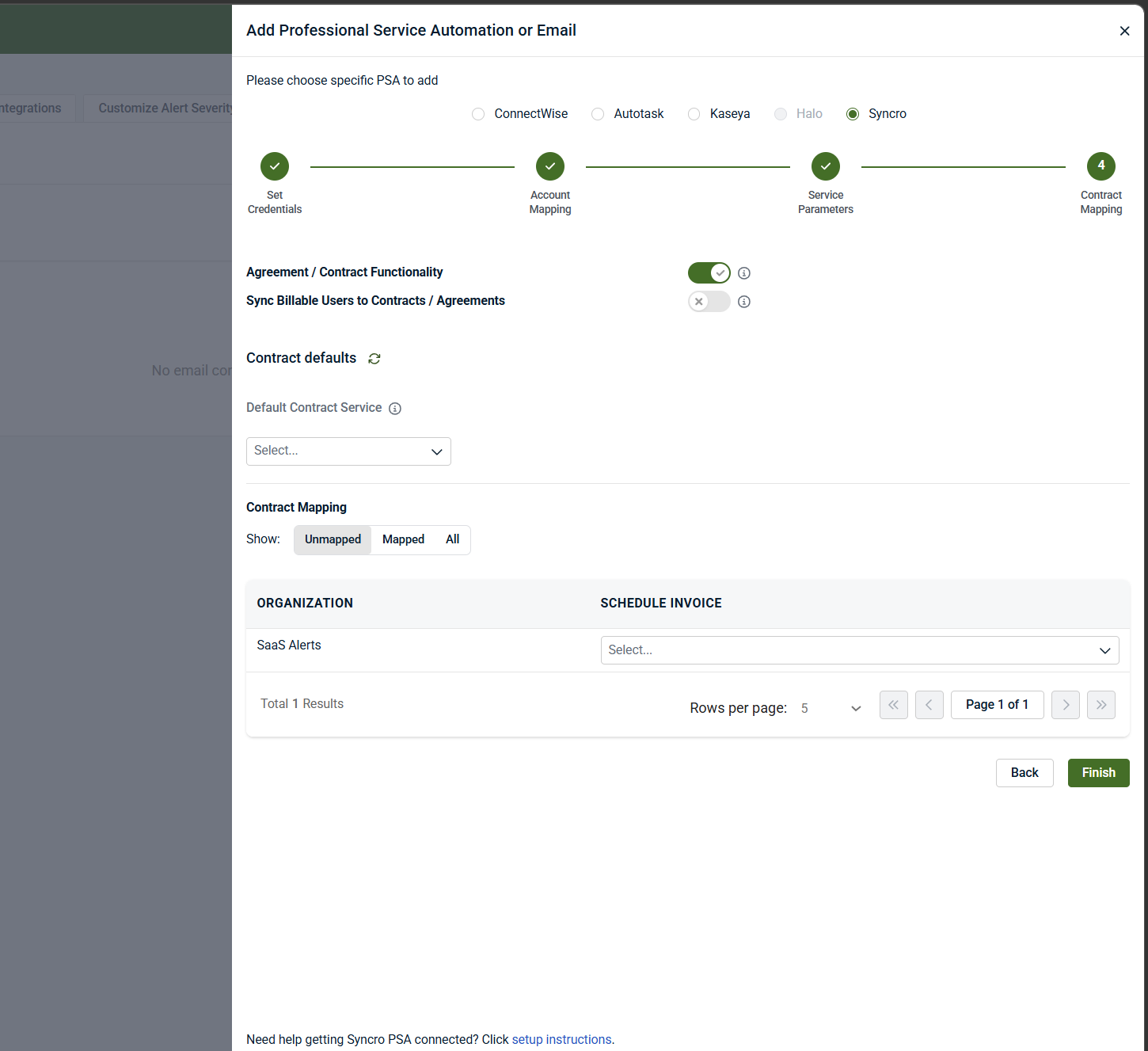
Agreement / contract functionality
Use these toggles to enable contract‑related behavior:
-
Add Agreements / Contracts to Tickets: When enabled, the selected Syncro agreement or contract is added to each ticket created for the organization.
-
Sync Billable Users to Contracts / Agreements: When enabled, billable user counts from SaaS Alerts are synchronized to the mapped Syncro agreement on a scheduled basis.
-
User Sync Day: Specifies the day of the month when billable user counts are synchronized to Syncro.
Enabling billable user synchronization does not affect alert creation or investigation behavior. It only updates contract quantities in Syncro.
Contract defaults (conditional)
If Sync Billable Users to Contracts / Agreements is enabled, a Default Contract Service is required.
-
The default contract service is used when user counts are synchronized and no organization‑specific service override is defined.
-
If no default service is selected while synchronization is enabled, the wizard displays a validation message and prevents completion.
If billable user synchronization is disabled, the default contract service is not required.
Contract mapping by organization
Use the Contract Mapping table to associate Syncro contracts with SaaS Alerts organizations.
-
For each organization, you can:
-
Select the Syncro contract to associate with tickets
-
Choose whether the default contract service should be added to that contract
-
Optionally review or override cost and price values (if applicable)
Organizations without a mapped contract will:
-
Still generate tickets (if ticket creation is enabled)
-
Not receive contract association or user count updates
Completion criteria
You can finish the wizard when one of the following is true:
-
Contract functionality is disabled, and no defaults are required
-
or
-
Required toggles are enabled and all mandatory fields (such as Default Contract Service) are configured
Contract mapping affects ticket enrichment and billing alignment only.
It does not:
-
Change alert detection
-
Modify alert severity
-
Affect investigations or SOC workflows
When the integration is completed successfully, Syncro appears as Active in Settings > PSA & Email, and a confirmation message is shown in the upper‑right corner of the interface.
Disable the integration in SaaS Alerts
To disable the integration, complete the following steps:
-
From the side navigation menu, click Settings.
-
Select PSA and Email.
-
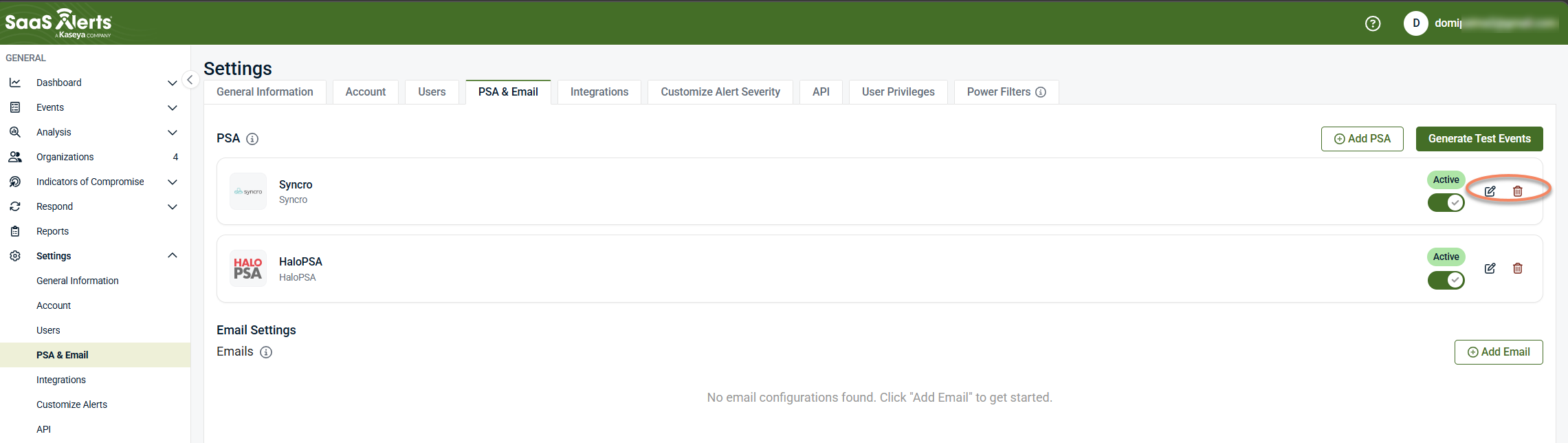
Locate the Syncro integration.
-
Do one of the following:
-
To temporarily stop ticket creation, use the toggle to pause the integration.
-
To permanently remove the integration, click the delete (trash) icon and confirm the removal.
-
Related articles
-
Integration: SaaS Alerts and Syncro RMM: Connect Syncro as an MSP tool to provide device and user activity data for Unify through organization‑level mapping and correlation
-
Unify overview: Understand how Unify correlates device data from MSP tools with SaaS activity to enrich events, alerts, and Respond logic with device


