Integration: SaaS Alerts and INKY
 Security and navigation
SaaS Alerts
NAVIGATION Organizations > Edit Organization > New Application
PERMISSIONS Administrative access to configure applications
INKY
NAVIGATION Settings > Integrations
PERMISSIONS Access to generate API keys
The INKY integration allows SaaS Alerts to ingest INKY email security events as they are generated.
Once configured, events generated by INKY are ingested into SaaS Alerts and become part of your monitored activity. These events can include analysis results, user-reported activity, outbound analysis, and workflow-related actions. This provides visibility into INKY activity alongside other monitored applications in SaaS Alerts.
This integration is available to customers with either an INKY Advanced or INKY Pro subscription.
Event coverage and behavior may evolve as additional data and use cases are validated.
Prerequisites
Before configuring the integration, ensure the following:
-
An active SaaS Alerts partner instance
-
Administrative access in SaaS Alerts
-
An INKY Advanced or INKY Pro subscription with API access enabled
-
Access to generate an API key in INKY
How the integration works
The INKY integration in SaaS Alerts is configured by adding INKY as an application and providing an API key generated in INKY.
During setup:
-
You select the INKY environment (for example, US or EU)
-
You provide an API key generated in INKY.
SaaS Alerts uses this information to establish the connection and begin ingesting events
After the connection is established:
-
Events generated by INKY are ingested into SaaS Alerts
-
Events are mapped into SaaS Alerts and included in monitored activity
This process does not require polling or manual data export. Once configured, ingestion occurs automatically.
How to...
Set up the integration in SaaS Alerts
To enable the integration, complete the following steps:
Step 1: Navigate to Applications
In SaaS Alerts:
-
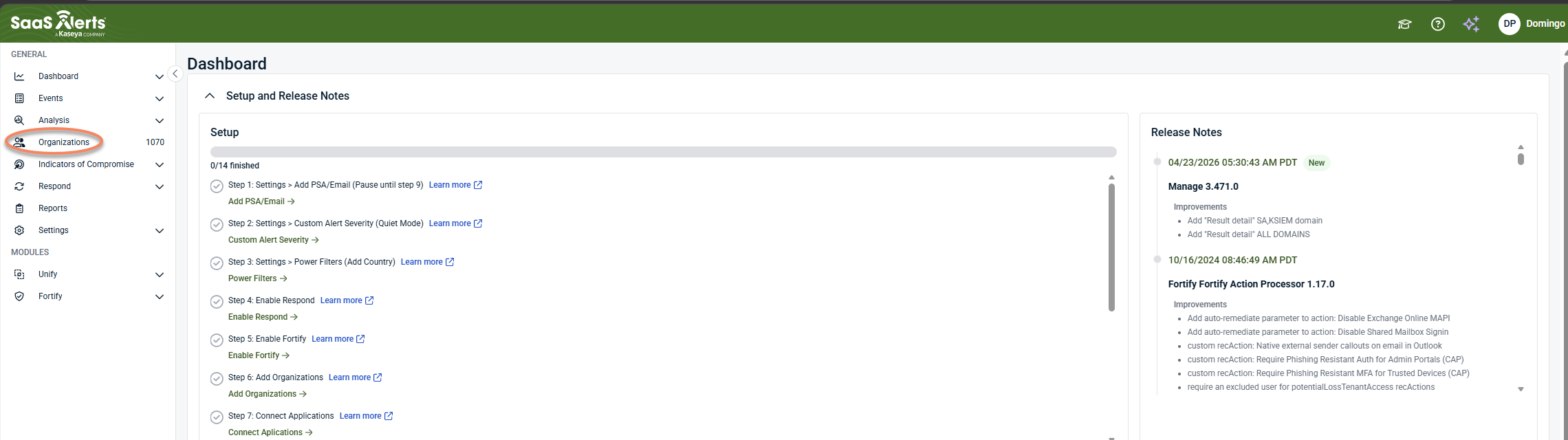
From the side navigation menu, click Organizations.
-
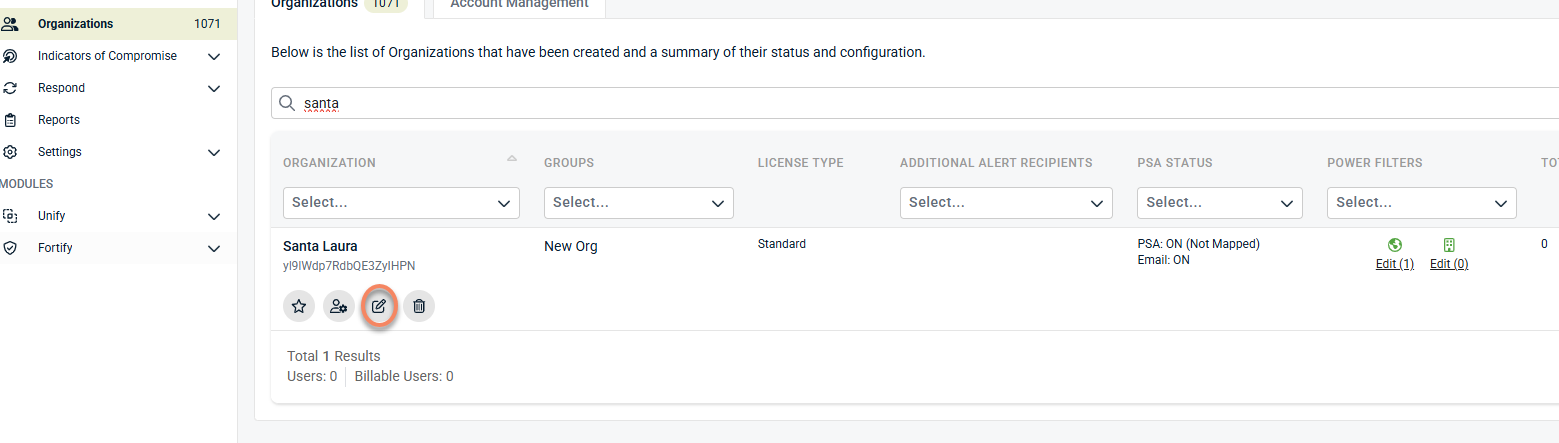
Select the organization where you want to configure INKY.
-
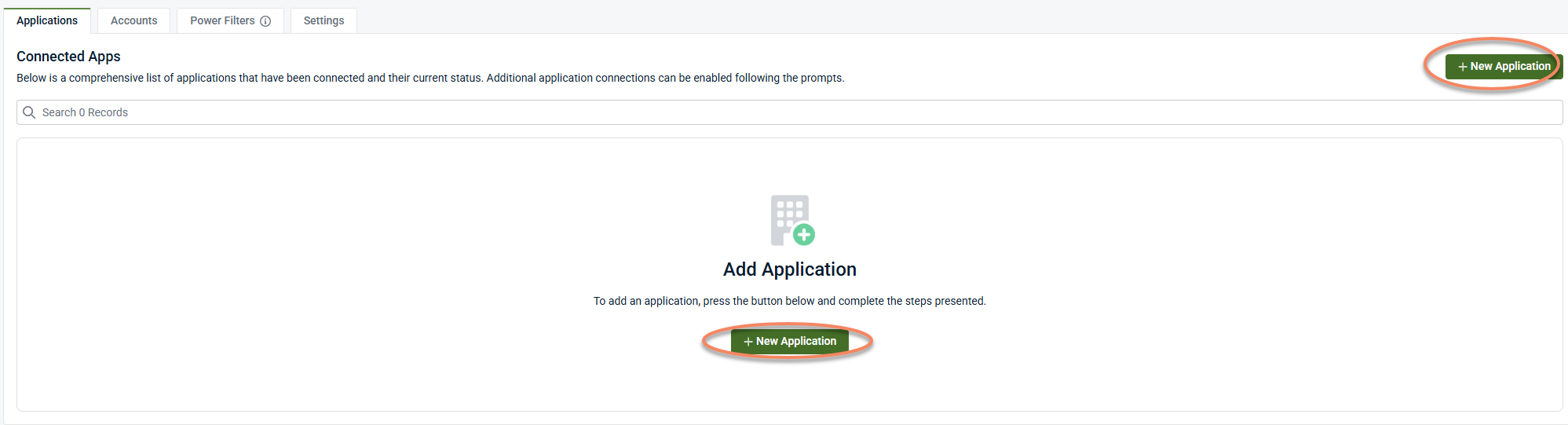
Click New Application.
Step 2: Select INKY
-
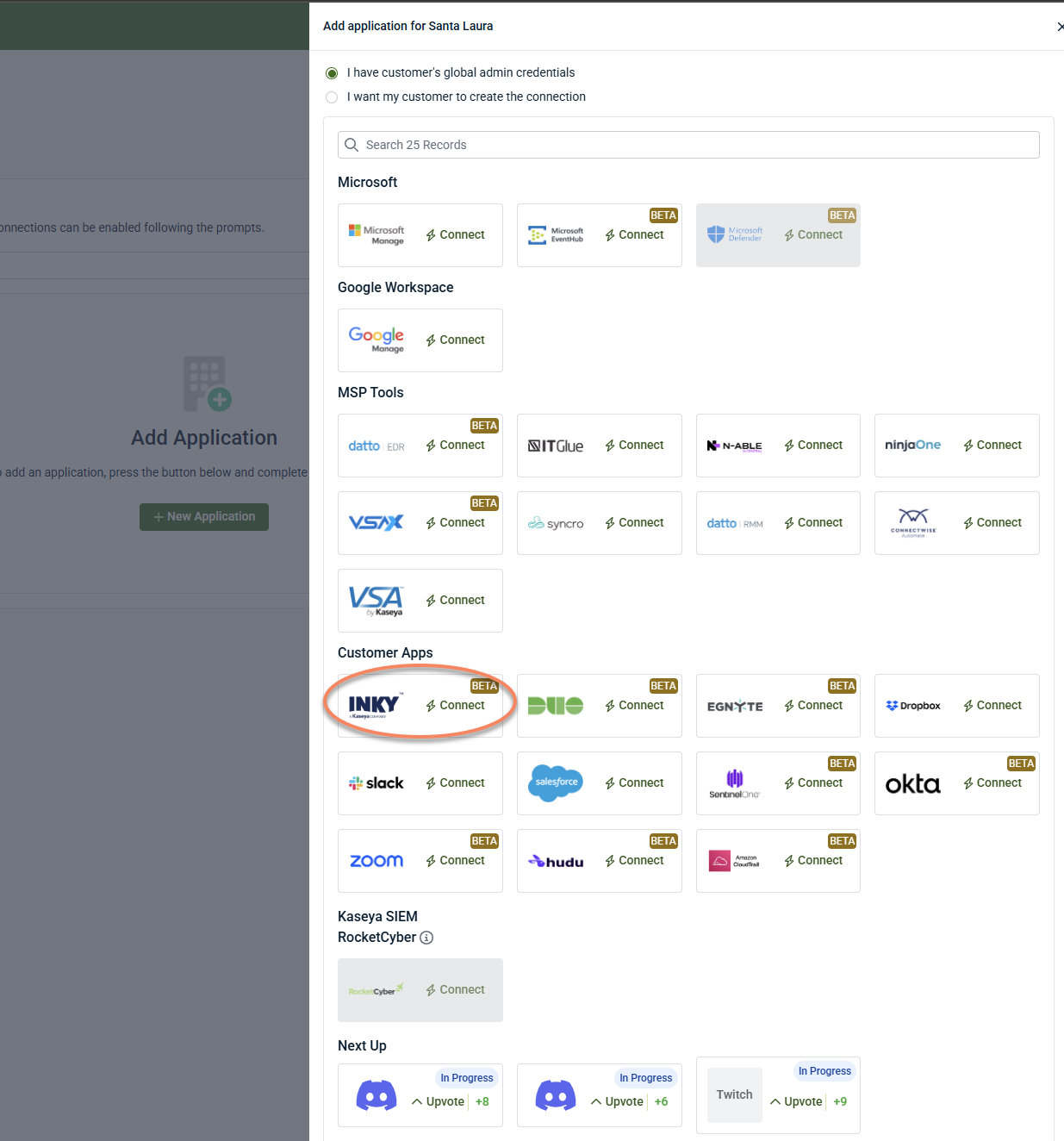
Locate and select INKY from the list of available applications.
-
Proceed to the configuration screen.
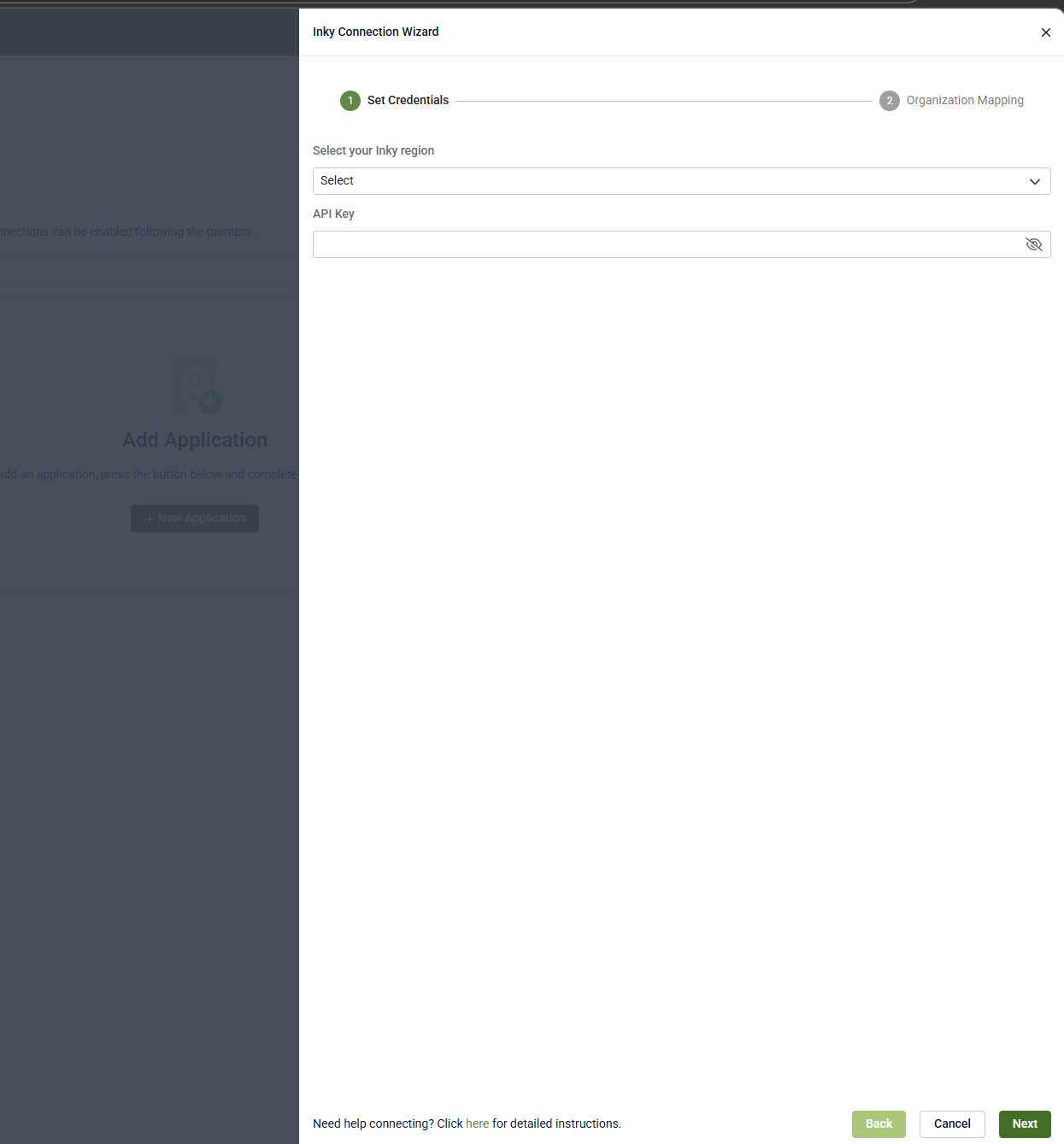
Step 3: Configure integration details
The INKY integration requires two values:
-
INKY instance (region): Select the environment where your INKY data is hosted (for example, US or EU).
-
API key: Paste an API key generated in INKY (see the next section).
After entering the required values, save the configuration. SaaS Alerts will attempt to establish the connection using the provided details.
Once the connection is established, event ingestion begins.
Set up the integration in INKY
This integration requires generating an API key in INKY.
To generate the API key:
-
Sign in to your INKY environment
-
Navigate to Settings > Integrations
-
Click the KSIEM / SaaS Alerts card to open the setup wizard
-
Click Get Started
-
Click Generate API Key. Copy the key at the time it is created. The full API key value cannot be retrieved after it is generated.
-
After generating the key, return to SaaS Alerts to paste the API key into the corresponding field mentioned in Step 3.
-
In INKY, click I've Pasted the Key — Verify Connection.
INKY verifies the connection after the API key is entered in SaaS Alerts. This typically takes a few seconds after you paste the key. The page shows a live status:
-
Waiting: Awaiting connection from SaaS Alerts
-
Taking longer than expected: No connection detected after 2 minutes; verify that the API key was pasted correctly in SaaS Alerts and try again
-
Error: A verification error occurred; retry or skip and verify later
If needed, you can proceed even if verification is not complete and confirm the connection status afterward.
When the connection is successful, INKY indicates that the integration is active and events are being sent.
If required, the API key can be regenerated or revoked in INKY. Regenerating the key requires updating the configuration in SaaS Alerts. Revoking the key stops event ingestion.
If an API key is generated but the connection is not completed, INKY may detect that a key exists without an active connection.
In this case, return to the integration in INKY and regenerate or revoke the key to restart the setup process.
Connection status
The KSIEM / SaaS Alerts card on the integrations list shows one of three states:
-
Connected: The integration is active and events are being received
-
Pending: A key has been generated but the connection is not yet established
-
Not connected: No active integration key is configured
Disable the integration in SaaS Alerts
To disable the integration, complete the following steps:
- In SaaS Alerts, go to Organizations and select the organization where the INKY integration is configured.
-
Open the INKY application configuration in the Applications tab.
-
In the Connection Status section, select Disconnect Application.
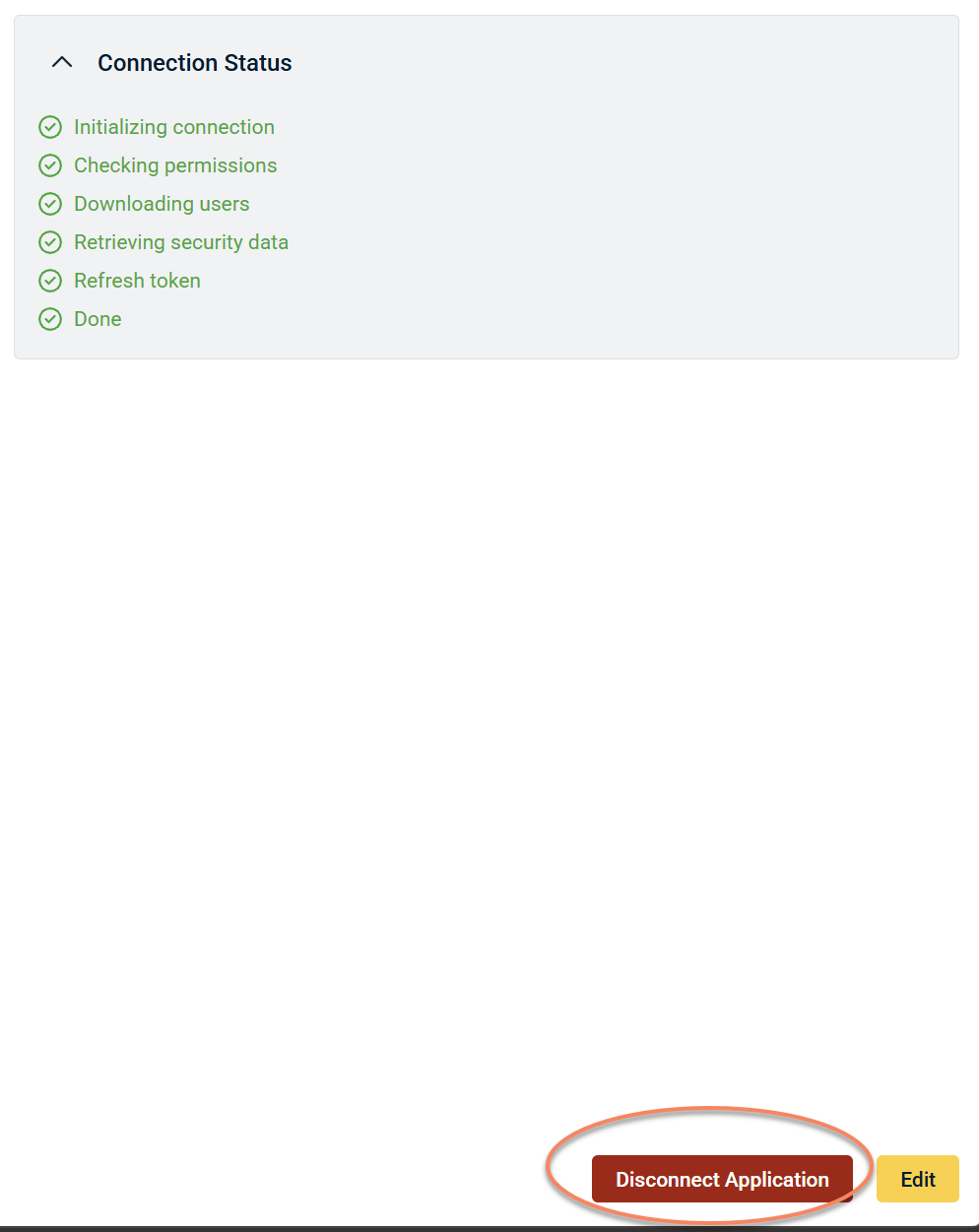
After disconnecting:
-
The integration is removed and no new events are ingested into SaaS Alerts
-
Existing data remains available for investigation and reporting
-
Event behavior and coverage
The INKY integration sends email security-related events into SaaS Alerts. A set of event mappings is configured as part of this integration, including:
-
Events mapped to specific conditions
-
A general catch‑all event for additional data
Event coverage may expand over time. Additional patterns and mappings may be introduced as support for additional INKY event types becomes available.
Where events appear in SaaS Alerts
After the integration is active:
-
INKY events are visible alongside other SaaS Alerts event data
-
Events can be reviewed through the standard alerting and event workflows
-
Filtering, investigation, and response behavior follow standard SaaS Alerts patterns
Event visibility depends on:
-
Successful connection to INKY
-
Activity occurring in the INKY environment
-
Normal ingestion and processing timing
Validation after setup
After configuring the integration, verify that it is working as expected:
-
Confirm that the INKY application appears under the organization
-
Confirm that the connection is active (no errors in configuration)
-
Review recent events to confirm that INKY activity is visible
If events are not visible immediately, allow time for:
-
Event generation in INKY
-
Ingestion and processing in SaaS Alerts
Lack of immediate data does not necessarily indicate a configuration issue.
Troubleshooting
INKY does not appear in the application list
-
Confirm that the INKY integration is enabled for your SaaS Alerts instance
Unable to connect after entering API key
-
Verify that the API key was copied correctly from INKY
-
Confirm that the correct INKY region (US/EU) is selected
-
Regenerate the API key in INKY and try again
No events appear in SaaS Alerts
-
Confirm that INKY is generating events in your environment
-
Confirm that the integration is active and correctly configured
-
Allow time for ingestion and processing
Important considerations
-
This integration is configured at the organization level in SaaS Alerts
-
If configured at the organization level, the integration may apply to child teams depending on permissions and configuration
-
Event ingestion depends on data generated in INKY; it does not create events on its own
-
Event mappings may be updated over time as additional event types and mappings are supported.
-
The integration does not change or affect INKY configuration or behavior
Avoid configuring duplicate INKY integrations
If an INKY integration already exists, SaaS Alerts displays a warning indicating that a connection is already in place.
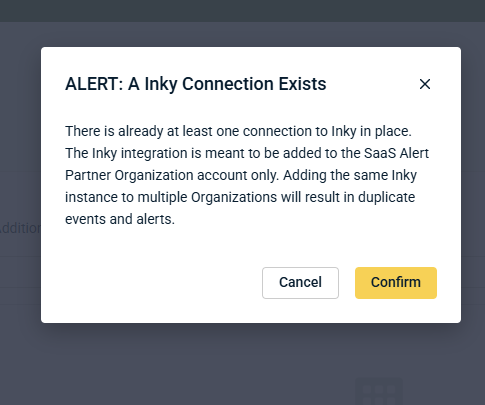
The INKY integration is intended to be configured at the SaaS Alerts partner organization level. Adding the same INKY instance to multiple organizations can result in duplicate events and alerts.


