Integration: Datto EDR and SaaS Alerts integration
 Security and navigation
Datto EDR
NAVIGATION Users & Tokens > API Tokens
PERMISSIONS Admin user
SaaS Alerts
NAVIGATION Applications (add new application)
PERMISSIONS User with permission to add applications
This integration connects Datto EDR with SaaS Alerts to enable endpoint security event monitoring within SaaS Alerts. By linking the two platforms, SaaS Alerts can ingest key IAM and endpoint events from Datto EDR, giving MSPs a unified view of endpoint and SaaS security activity across their customers.
Prerequisites
-
Admin access to Datto EDR
-
Access to SaaS Alerts with permission to add applications
-
Organizations in Datto EDR should be configured following Datto EDR best practices. Assign a separate organization for each customer for best results.
How to...
Set up the integration in Datto EDR
To generate the API token required for the integration, complete the following steps:
-
Log in to Datto EDR as an admin user.
-
Copy the URL from your address bar (for example, https://yourcompany.infocyte.com) and store it in a secure location.
-
Click your username in the upper-right corner of the page and select Admin.
-
Navigate to Users & Tokens > API Tokens.
-
Click Create new token.
-
Enter a token description (for example, SaaS Alerts).
-
Copy the generated token immediately and store it securely. The token may not be shown again.
Datto EDR generates your API token. You are now ready to complete the setup in SaaS Alerts.
Set up the integration in SaaS Alerts
This integration also requires setup in SaaS Alerts. Complete the following steps:
-
Add a new application to the appropriate organization (typically your MSP organization).
-
Select Datto EDR.
-
Fill in the URL and API token you copied from Datto EDR.
-
Click Finish.
The Datto EDR integration is now active in SaaS Alerts. SaaS Alerts will begin monitoring the events listed below.
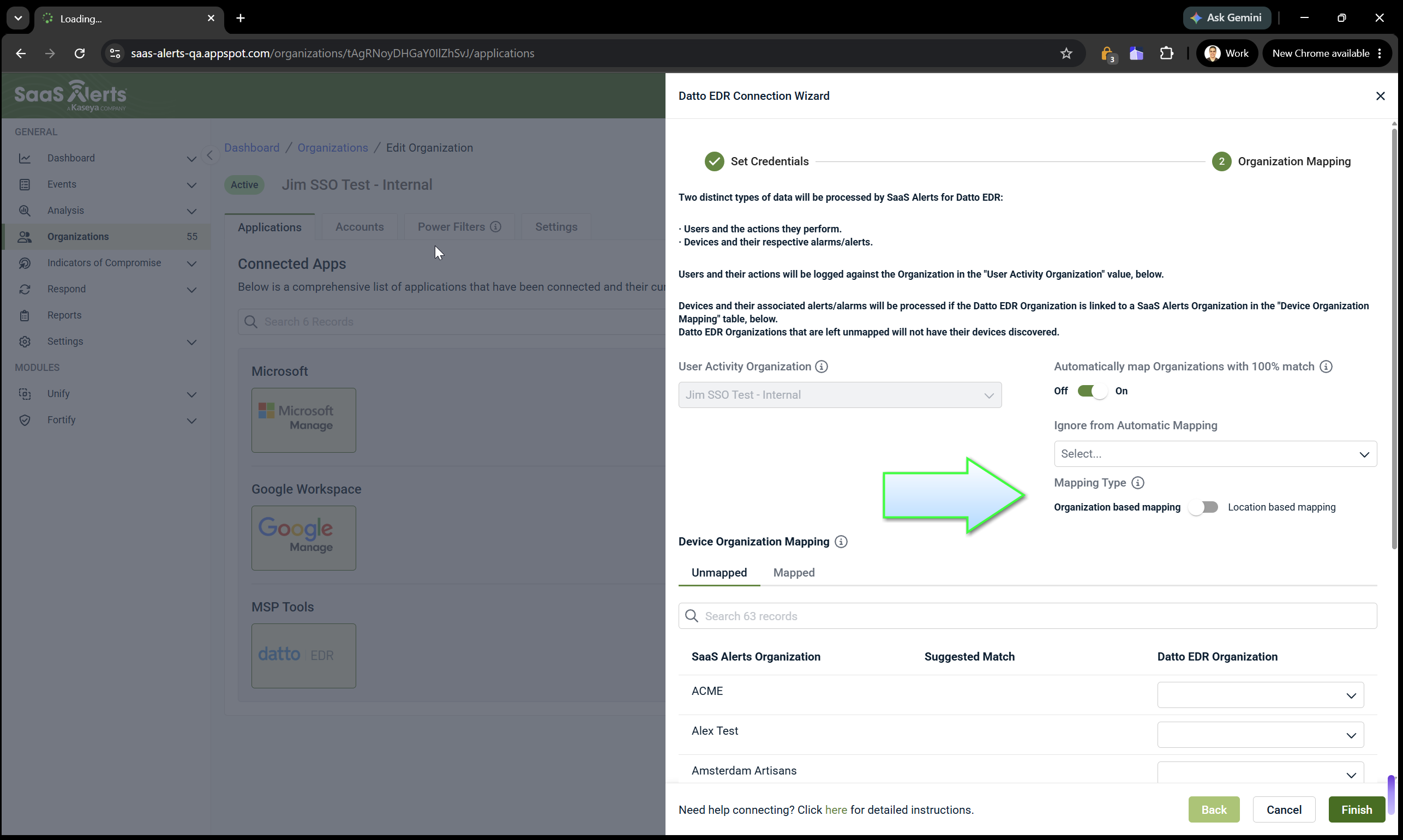
When configuring the Datto EDR integration, select the mapping type that matches how your Datto EDR environment is organized:
-
Organization-based mapping: Map Datto EDR organizations to SaaS Alerts organizations.
-
Location-based mapping: Map Datto EDR locations to SaaS Alerts organizations.
After selecting a mapping type, complete the organization mappings displayed in the wizard.
Monitored events
Once the integration is set up, SaaS Alerts monitors the following Datto EDR events:
- IAM Event - Authentication Success
- IAM Event - User Created
- Endpoint Device - Monitoring info
- Endpoint Device - Monitoring event
Disable the integration in SaaS Alerts
To disable the integration, complete the following steps:
-
In SaaS Alerts, navigate to the application list for the relevant organization.
-
Locate the Datto EDR application.
-
Select the option to remove or disable the application and confirm the action.
The Datto EDR integration is disabled and SaaS Alerts will no longer receive events from Datto EDR.
FAQ
Why don't I see the expected Datto EDR organizations or locations?
Verify that the appropriate mapping type (Organization-based mapping or Location-based mapping) is selected during configuration. The available mappings depend on how your Datto EDR environment is configured.
Where do I find my Datto EDR URL
Your Datto EDR URL is the address shown in your browser when you are logged in to Datto EDR (for example, https://yourcompany.infocyte.com). Copy and store this URL before beginning the SaaS Alerts setup.
I didn't save my API token. What should I do?
API tokens are only displayed once at the time of creation. If you did not save your token, navigate to Users & Tokens > API Tokens in Datto EDR, delete the existing token, and create a new one.


