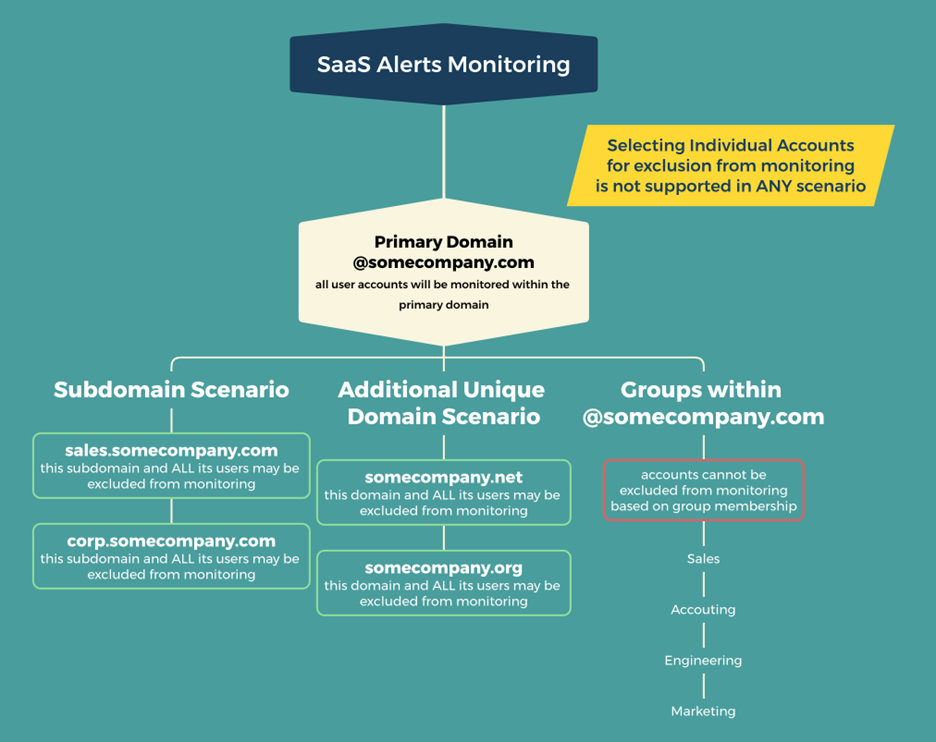
Blocking Subdomain users from SaaS Alert monitoring
Requirements
The exclusion of subdomains for billing can be accommodated in scenarios where an education partner has clearly defined subdomains for students versus faculty (K-12 and Higher Education).
IMPORTANT Billing exclusions for what SaaS Alerts defines as a "Billable User" will only apply to EDU student accounts on clearly defined subdomains.
Configuration
There are two scenarios in which users can be blocked from being monitored by SaaS Alerts within a Microsoft 365 Tenant. Both scenarios require additional approvals.
Scenario 1 : The tenant manages a primary domain and one or more subdomains of the primary domain. An example of this structure is:
- Tenant Primary Domain: ‘@somecompanyname.com’
- subdomain1: ‘@sales.somecompanyname.com’
- subdomain2: ‘@corp.somecompanyname.com’
In the above scenario, when the tenant is connected to SaaS Alerts for security monitoring, all the users for the primary domain and both subdomains will automatically be imported for monitoring and counted as billable users.
In this case, the MSP may request that the users of subdomain 1 or subdomain 2 be removed from the system and not monitored or counted as billable users. The request must be submitted to the account manager or support and will be technically managed by SaaS Alerts engineers.
Scenario 2: The tenant manages a primary domain and one or more additional unique domains within the same Microsoft 365 Tenant. An example of this structure is:
- Tenant Primary Domain: ‘@somecompanyname.com’
- additionalDomain1: ‘@somecompanyname.net’
- additionalDomain2: ‘@somecompanyname.org’
In the above scenario, when the tenant is connected to SaaS Alerts for security monitoring, all the users for the primary domain and both additional unique domains will automatically be imported for monitoring and counted as billable users.
In this case, the MSP may request that the users of additionalDomain1 or additional Domain2 be removed from the system and not monitored or counted as billable users. The request must be submitted to the account manager or support and will be technically managed by SaaS Alerts engineers.
What about user groups?
The above scenarios should never be referred to as “Groups” or “Groupings.” The term “Groups” in the context of Microsoft 365 or Google Workspace refers to logical collections of users within the same domain, used for simultaneous message routing to groups of users, as well as the application of security privileges or other system settings to multiple users at the same time.
User Groups may not be excluded from monitoring when a Microsoft 365 or Google Workspace tenant is connected to SaaS Alerts.